01 · today · timeline · week
three views of time.
three primary tabs: today, the day timeline and week. keys 1, 2 and 3 switch between them. the month view is retired; existing month defaults reopen on today. focus tasks remain a secondary command.
 AIM mindset apps
 Calendar Controlthe Mac calendar under the menu bar
native macos · version 1.2.5
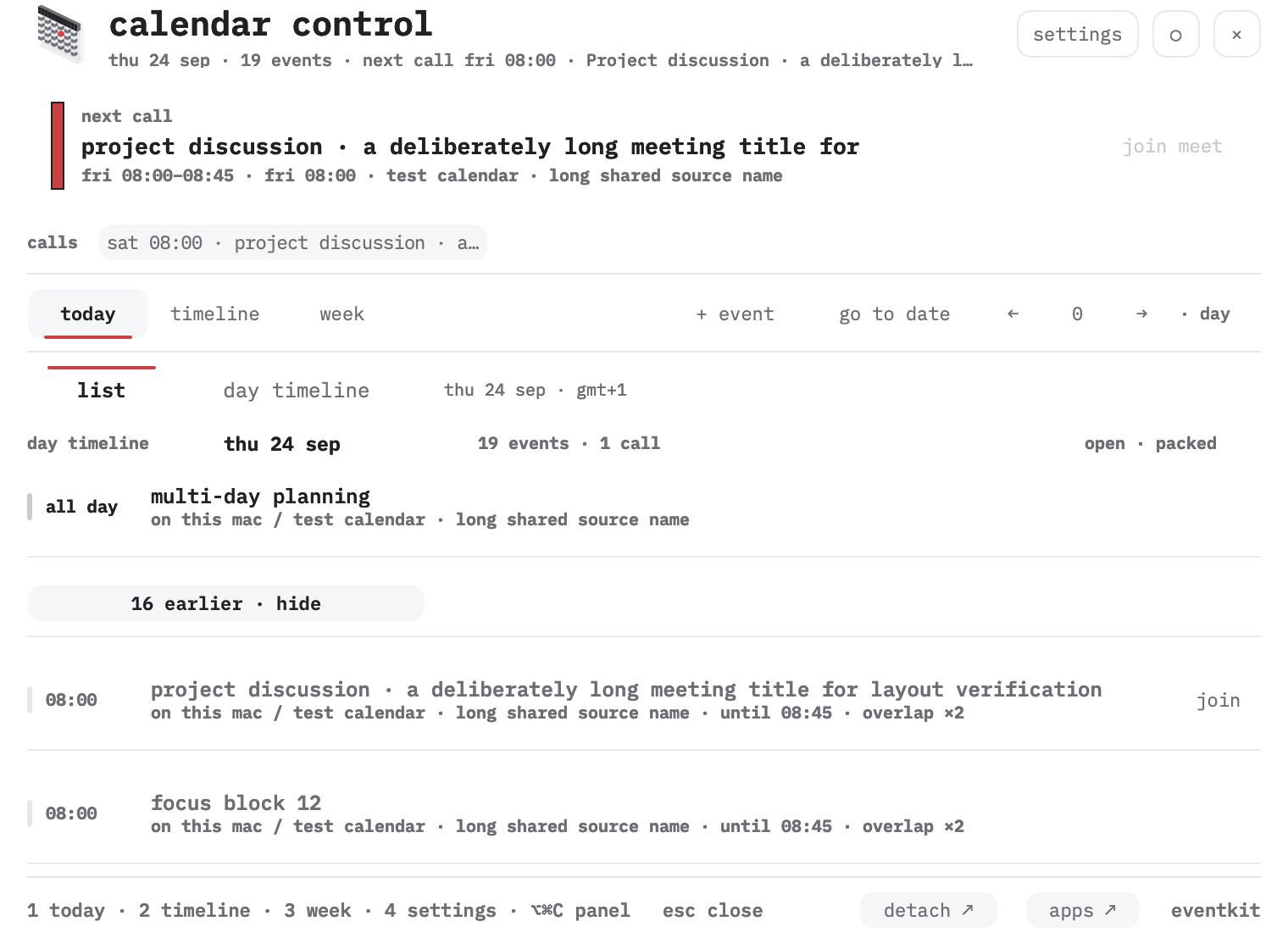
the mono mark in the menu bar, or ⌥⌘C from anywhere, drops a 760 × 560 panel; the week calendar widens to 1120 × 800 and returns. esc, the mark, the same key and a click in another app close it, ◉ keeps it open, detach moves the same content into an ordinary window. the calls of the day sit in a bar under the header with join on the nearest one, then the day list; one red line for now, one thin stripe for the source calendar, and a small card the chosen minutes before an event.
apple silicon · macos 13+ · local beta
ad-hoc signed, not notarized
one situation
a call in 12 minutes, the link sits in the event description.
a small card came 5 minutes before, near the menu bar.
join opens the meeting; snooze and dismiss are kept for this event.
the same reminder also goes through local macos notifications. the app opens the link only when you press the button.
01 · today · timeline · week
three primary tabs: today, the day timeline and week. keys 1, 2 and 3 switch between them. the month view is retired; existing month defaults reopen on today. focus tasks remain a secondary command.
02 · event details
the time range with its timezone, an inclusive last date for all-day events, and original notes under show notes in a scrolling area. the day and week keep their position.
03 · reminders
a card and a local macos notification before every timed event or only before calls with a link. presets 1 · 3 · 5 · 10 · 15 · 30 or any number of minutes; the next 48 hours are reconciled at launch, on eventkit changes and every minute.
04 · one mark · apps
the header draws the voxel character at 40 pt: it follows the cursor, a click scatters and reassembles it and moves the red today to a neighbouring day, and calendar data never changes. the flat drawing keeps the menu bar, where 18 pt turns a voxel body into a block, plus about and the favicons. apps in the footer opens the installed MEM PRISM and Language Relay.
05 · calls
under the header, in every view, a row of the next three calls in the coming 48 hours: now for a running one, in N min under an hour, the time today, weekday and time further out. the nearest call is the active row and carries join from ten minutes before the start to the end of the call; outside that window the row says when join opens. a press on any call opens that day and selects it. the rail is drawn in every state, and it stays empty until macos grants full calendar access: the grant is tied to the signature, so a rebuild installed over the old one asks for it again and the footer of the panel reads permission required until it is given.
07 · menu bar · keys
the item is in the menu bar by default and how it looks is one list: mark, mark + value with the next call, value alone, or hidden behind a confirmation that names how the panel is reached without it. the settings row shows a live preview of the item in the chosen mode, and the position survives a rebuild. ⌥⌘C opens the panel from anywhere and closes it again; the combination is editable, a key already held by another app of the family is refused with a red line and never stored, and the footer names the live one.
06 · notifications
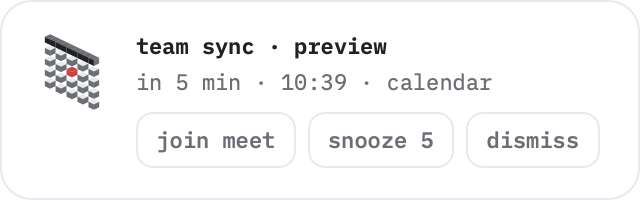
the chosen minutes before an event a card appears: inside the window when it is open, as a small floating card near the menu bar when it is closed, and as a macos notification. three buttons at most: join with a meeting link or open day, snooze 5 (or the lead when it is shorter), dismiss. one card per occurrence; snooze and dismiss are remembered by occurrence id, the card leaves after 45 seconds or after any button.
the card never takes focus and never moves the cursor: a non-activating panel from the shared hint-card component of the apps family. settings → floating card turns it off; reduce motion shows it at once.
keys
release notes
release-notes.txt · five latest entries load here
local beta · 1.2.5
reminders are enabled in settings → event reminders and ask for notification permission separately. autostart can be added in macos login items. to remove the app, quit it, drop the login item and move it to the trash.
quit Calendar Control, keep a copy of the installed app and replace it with the new build at the same path. then open it again. settings live in ~/.config/calendar-control/config.json and in userdefaults; they survive the swap.
the app reads the calendars macos eventkit already exposes and creates an event only through the “+ event” form. deletion, invitations, series editing and account setup stay in macos calendar and internet accounts.
events are read through eventkit on your mac. the app has no server, no telemetry, no account login and no network requests. audit files and screenshots are local files and stay with you.
notifications go through the local macos notification center. the app opens a meeting link only when you press join.
version 1.2.5 is built on the shared design-token export of the apps family: white surfaces, IBM Plex Mono, 8 and 16 pt corners, one red signal for “now”, and the shared voxel character verified by hash. reduce motion removes panel transitions and keeps the mark static. shared apps design system ↗
1.2.5 · build 80
Open an event to see and copy its full meeting URL. Join opens that meeting at any time. Google snapshot events include a Google Calendar button for invitation responses and editing. Missing meeting links are never invented.
Keep open pins the panel; Pinned means outside clicks leave it open. Current meetings remain highlighted until they end. The optional local Google snapshot is read-only and shows when refresh is required; continuous Google sync is not included.