01 · see
a working picture with sources.
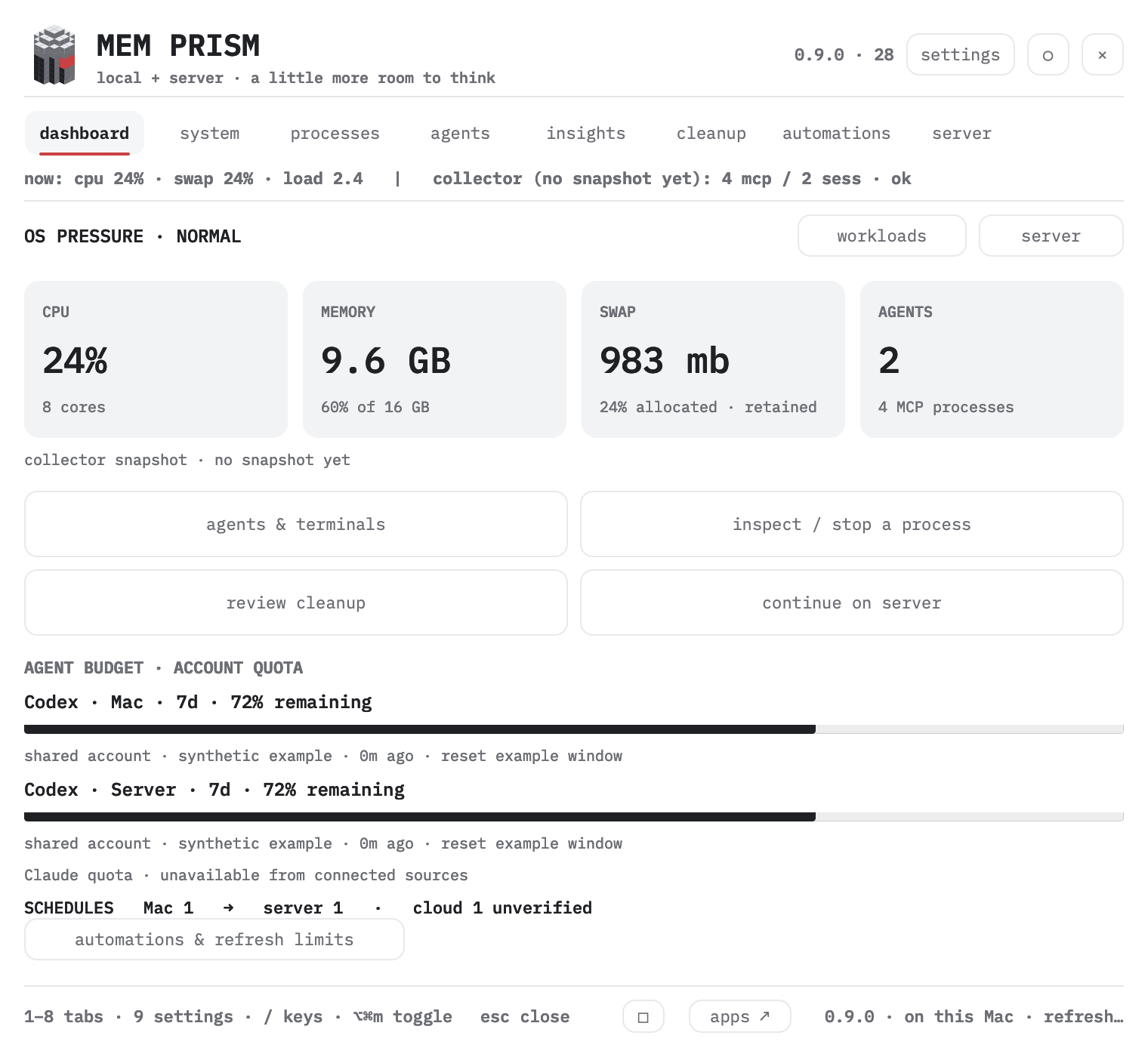
CPU, memory, swap and active agents in one calm snapshot; each number names how it was taken and how fresh it is, and the graphs carry the last 24 hours at one point per minute.
 AIM mindset apps
 MEM PRISMmemory, processes and agents of a Mac
native macOS · version 0.9.0
pressure, swap, processes and agents read as one working picture. the decision stays with you.
Apple Silicon · macOS 13+ · local beta
ad-hoc signature, not notarized
one example
swap is 80% full.
memory pressure is normal.
no urgent cleanup needed.
swap can stay after a load. MEM PRISM reads it together with the current memory pressure.
try it here
this illustration has no access to memory, processes, sessions or servers. every name, reading and server flow below is invented.
MEM PRISMDEMO · 0.9.0 · 28 · local + serverA little more room to think.
Four large dashboard buttons open agents and terminals, process inspection, cleanup and server continuation. Cleanup has its own tab with four previews and explicit confirmation. Light and dark themes cover the entire native panel.
System adds free storage, power, uptime, thermal state and cumulative network counters. Agents shows all CLI observations in pages and offers navigation to an existing Orca terminal after checking its exact handle. Agent sessions remain protected.
01 · see
CPU, memory, swap and active agents in one calm snapshot; each number names how it was taken and how fresh it is, and the graphs carry the last 24 hours at one point per minute.
02 · tune
four modes in one list: mark, mark + value, value, hidden. the mark is visible by default, the value carries cpu and swap, and hidden asks once and leaves the hotkey as the way back. settings show a live preview of the item. ⌥⌘M opens and closes the panel from anywhere; the settings field records it – press the field, then the combination, esc cancels and delete clears, and a combination without a modifier, a system one or one held by another product prints its reason in one red line and is not stored.
03 · continue
the server workspace creates a separate bounded task only after a preview. the local session stays open.
04 · live mark
the prism character stands 40 pt in the panel header: it assembles once on open, follows the cursor with a light parallax and answers a click by flashing the red core. the flat mark keeps the menu bar, the About window and the favicon. Reduce Motion keeps the character still.
05 · findings
growing swap, copies of one agent, sessions idle for hours, orphan mcp processes, an app whose memory keeps climbing, a filling disk and agent caches over their threshold. every finding is a card: what is seen, where the number comes from, what is proposed and how much it would free.
06 · your press
cleanup lists its files and their size before it deletes anything; stopping a process asks first and writes a receipt with pid, name, memory and time. agents, Finder, Apple daemons and the app itself are never stopped, and the protection list is yours to edit in settings.
05 · automations
Filter by scheduler, host and state. Inspect the source, last result and quota before a run.
| scheduler | available controls |
|---|---|
| Orca | Run once, pause, resume |
| Managed systemd | Registered tasks: run once, pause, resume; quota guard for Codex |
| Codex app / launchd | Inspect here; edit schedules in their owning app |
| Cloud | Manual records stay unverified until checked at the source |
A transfer plan records dependencies and a staged cutover. Existing sessions remain open. Extending an end date or changing a recurrence uses the owning scheduler.
The demo uses synthetic data. Private task names, quotas, hosts and logs are never used to build this page.
local beta · 0.9.0
xcode-select --install.hotkey: ⌥ + ⌘ + M ⌥⌘M opens and closes the panel; the settings field records it, esc cancels and delete clears, and a combination held by another app or by macOS prints in red and is not stored. four canonical combinations stay beside the field as a quick pick. autostart can be added in macOS Login Items. to remove: quit MEM PRISM from its menu, remove the Login Item and move the app to the trash.
quit only MEM PRISM with a right click on its icon → quit, keep a copy of the installed app and replace it with the new build at the same path. then launch again. do not keep two versions open. settings are preserved.
the detailed collector is limited to eight seconds; on failure the panel shows an error or the previous snapshot with a label. server checks run on request. this is a monitor and a checking tool: freeing RAM or speeding up the mac is not guaranteed.
the five latest entries of release-notes.txt, read from the same file the download points to.
0.9.0 · build 28
the app reads local system readings, process commands and parent relations. details and history are stored locally. there is no telemetry server, account login or browser access to mac memory.
the server workspace receives only the workspace and the task text you send to a separate task. existing apps and sessions stay under your control.
version 0.9.0 uses the shared N1 profile and the shared live mark. the character answers with a short movement and settles. Reduce Motion keeps the static state.
an automatic hint appears after 20 seconds of continuous macOS pressure. one hint per episode, at least 30 minutes apart; snooze survives a restart. hint history lives in settings, measurement history in system.
a server run creates a new Codex task from the given handoff. the current local session stays open.